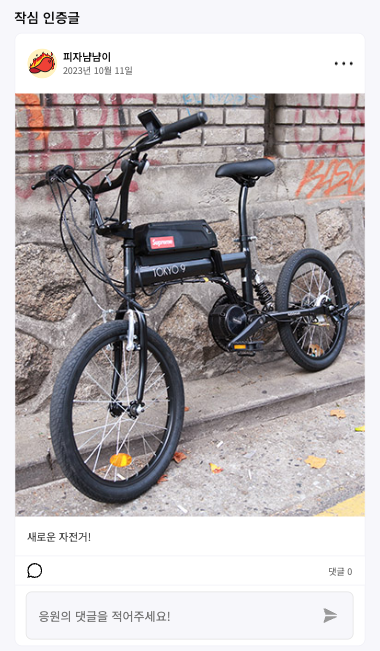
진행하고 있는 프로젝트에서 댓글창 부분 위아래로 회색선을 만들어야했다.
좀 더 깔끔한 코드를 위해서 before와 after를 이용해서 구현해보았다.
기존 코드
// 컴포넌트부분
const CommentOptionsBar = ({ postProps }: { postProps: PostProps }) => {
  return (
    <CommentOptionsBarS>
      <img src={comment_icon} alt='comment-icon'></img>
      <div>댓글 {postProps.postData.commentCount}</div>
    </CommentOptionsBarS>
  );
};

// styled-component 부분
const CommentOptionsBarS = styled.div`
  height: 2.5rem;
  background-color: var(--color-white);
  display: flex;
  align-items: center;
  justify-content: space-between;
  padding: 0 1rem;
  img {
    width: 1.25rem;
    height: 1.25rem;
  }
  div {
    font-size: 0.75rem;
    color: var(--font-color3);
  }
`;
작성한 코드
const CommentOptionsBarS = styled.div`
  position: relative;
  height: 2.5rem;
  background-color: var(--color-white);
  display: flex;
  align-items: center;
  justify-content: space-between;
  padding: 0 1rem;

  &::before,
  &::after {
    content: '';
    position: absolute;
    left: 0;
    right: 0;
    height: 1px;
    background-color: var(--color-line);
  }

  &::before {
    top: 0;
  }

  &::after {
    bottom: 0;
  }

  img {
    width: 1.25rem;
    height: 1.25rem;
  }
  div {
    font-size: 0.75rem;
    color: var(--font-color3);
  }
`;
1. position: relative;와 position: absolute;를 넣은 이유
상대위치와 절대위치를 정해놔야지 스타일이 제대로 먹는다.
2. content: '';를 넣은 이유
빈 값을 넣어야 스타일이 먹음
3. left, right
이걸 넣어야 width: 100%한것처럼 됨
4. top, bottom
이걸 넣어야 댓글창 기준으로 위와 아래에 선이 생긴다.
이미 공부한 내용이고 실제로 만들어본 적도 있는 방법이지만 오랜만에 다시 구현하고자했더니 바로 바로 기억이 안나서 블로깅을 해보았다.
다음에 할 일이 생기면 바로 기억이 나길..
'개발 > 개발일지' 카테고리의 다른 글
| 화면크기에 따른 자식순서 바꾸기 (0) | 2023.11.02 |
|---|---|
| 마우스 커서 div박스로 만들기 (0) | 2023.10.20 |
| 모달 만들기 (0) | 2023.08.30 |
| 반응형 Navbar 만들기 (0) | 2023.08.28 |
| sidebar 만들기 (0) | 2023.08.25 |


댓글